---
title: "How many cookies does the GPU eat?"
description: "If a GPU were powered by cookies, how many cookies would it need to eat just to create a PR? I set out to answer this important question by writing a Pi extension for Neuralwatt inference."
author: "Brent Fitzgerald"
published: 2026-10-04T21:30:00Z
canonical: https://brentfitzgerald.com/posts/watt-hours-in-the-terminal/
---
# How many cookies does the GPU eat?
One of the inference providers in my rotation charges for measured energy instead of tokens. I wanted to see the energy numbers next to the costs, so I wrote a small [pi-neuralwatt extension](https://github.com/burnto/pi-neuralwatt) for my harness of choice, [Pi](https://pi.dev/). I used it three months and recently looked at what it had recorded.
And I also overdid it, as usual. So we now have a live measure of whatever unit we want. We can answer the question we've all been too afraid to ask: _How many cookies would need to be eaten by a fictional cookie-powered GPU to run our little agentic coding sessions._
Whether you find this dumb or fun depends on your definitions of those words.
Chocolate chip cookie consumption
## Neuralwatt
I have no affiliation with [Neuralwatt](https://neuralwatt.com/). My interest is mostly just that I found it intriguing as a preview of a commodified inference economy where the cost of electricity dictates what we can do and afford.
The pay-as-you-go rate is currently [$10/kWh](https://portal.neuralwatt.com/pricing). For reference, my home electricity peaks at $0.52/kWh, which is *absurdly* expensive compared to most of the U.S. but still only 5% of this inference rate. But I'm not really buying any old electrons. I'm paying for GPU time with an energy meter.
The [methodology docs](https://docs.neuralwatt.com/energy-methodology) say they read GPU power counters through [NVML](https://developer.nvidia.com/management-library-nvml), which is (I learned) a library for reading stuff like power usage and utilization from NVIDIA GPUs. Then they give each request a share of the server's measured energy based on its share of tokens in flight, up to a cap. So my energy use presumably depends partly on who/what else is using the GPUs.
The pricing only counts (as far as I can tell) GPU inference. No cooling, host CPU, or networking. So the numbers are a floor. When Google [measured the full picture](https://arxiv.org/abs/2508.15734) for a Gemini prompt, the AI chips themselves were only a bit over half the total. The rest was the supporting computers, spare machines, and cooling. And obviously the energy costs of training the models are not reflected here.
I'm no expert in data center energy, so I'm trusting Neuralwatt's numbers to be accurate-ish. And I'm not making any big decisions based on this stuff. Just little decisions. About cookies.
## Three months of records
The extension records every Neuralwatt response. Earlier versions didn't track everything perfectly, so the older records are rough, but I had the energy numbers. Between July and early October I had over 5,500 responses. It was mostly deepseek and glm coding.
- **A typical response used about 0.2 Wh.** This is about a minute of a 10 W LED bulb.
- **A typical real working session** (say, enough back and forth to land a PR) **used about 12 Wh**, or 12 cents at pay-as-you-go rates.
- **My biggest feature used about 250 Wh.** It involved building a whole revision management system with a novel interface, auth changes, etc.
- **All of it together came to about 3 kWh**. That's probably 10-12 miles in an electric car I guess? I don't have an electric car, but it would fully discharge my RAV4 hybrid's little battery twice.
0.2 Wh is right in the range of published estimates for a single chatbot prompt (Google says [0.24 Wh](https://arxiv.org/abs/2508.15734) for a median Gemini text prompt, all-in). I'd assumed agentic coding would be much worse, since every turn resends the whole conversation. In my sessions the median context was about 70,000 tokens. So caching is where the efficiency comes from. About 98% of my input tokens were cache reads, which are cheap. Agents mostly read a lot and write a little. An output token cost something like 50 times as much energy as a new input token.
Still, the context costs add up. Energy per response grew as sessions went on. The first few turns of a session used about 0.06 Wh each. After turn 50 it was closer to 0.3 Wh. Another reason to start fresh sessions often.
## Cookie costs
But you're not here for the watts per hour. You're here for the cookies.
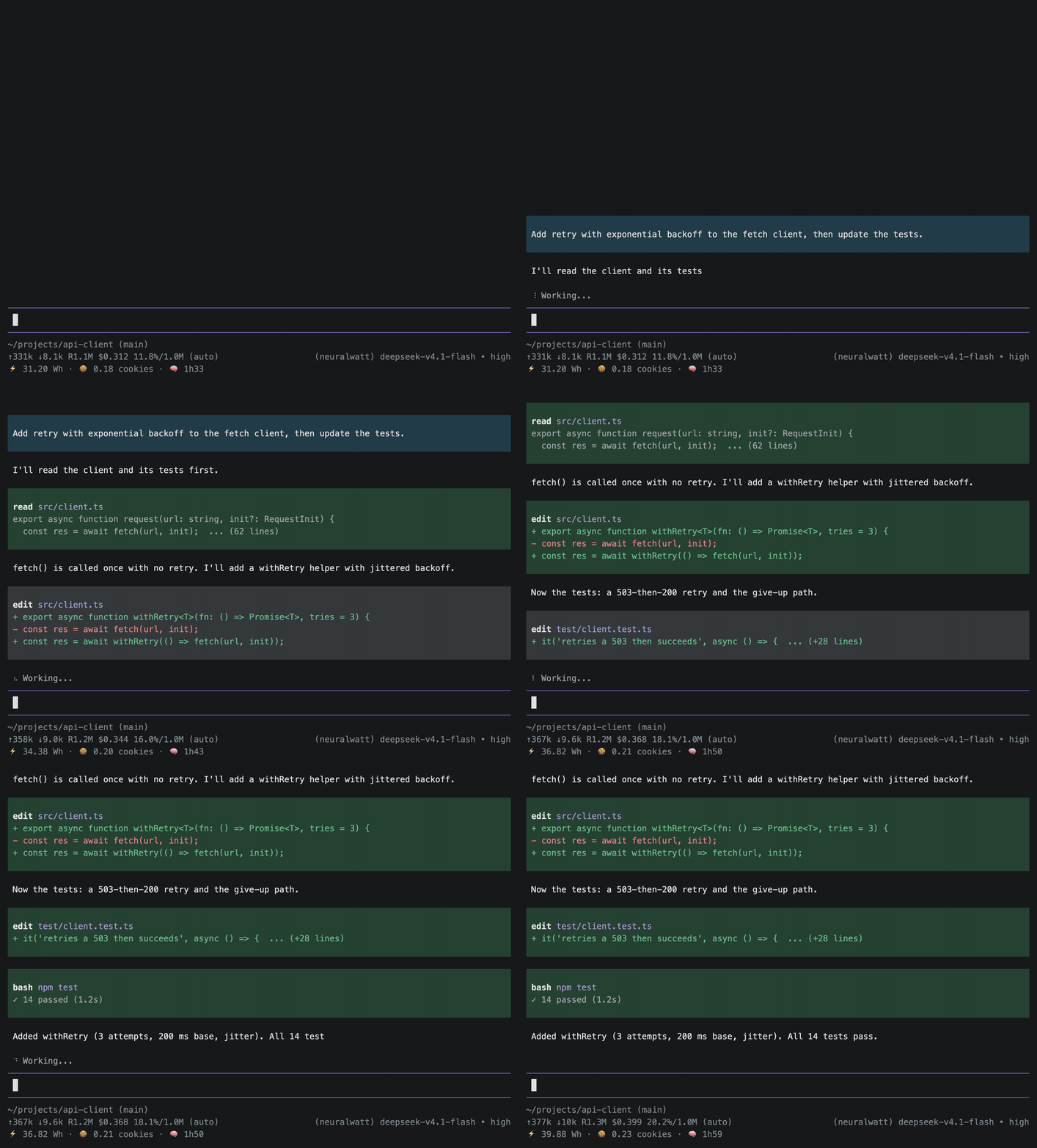
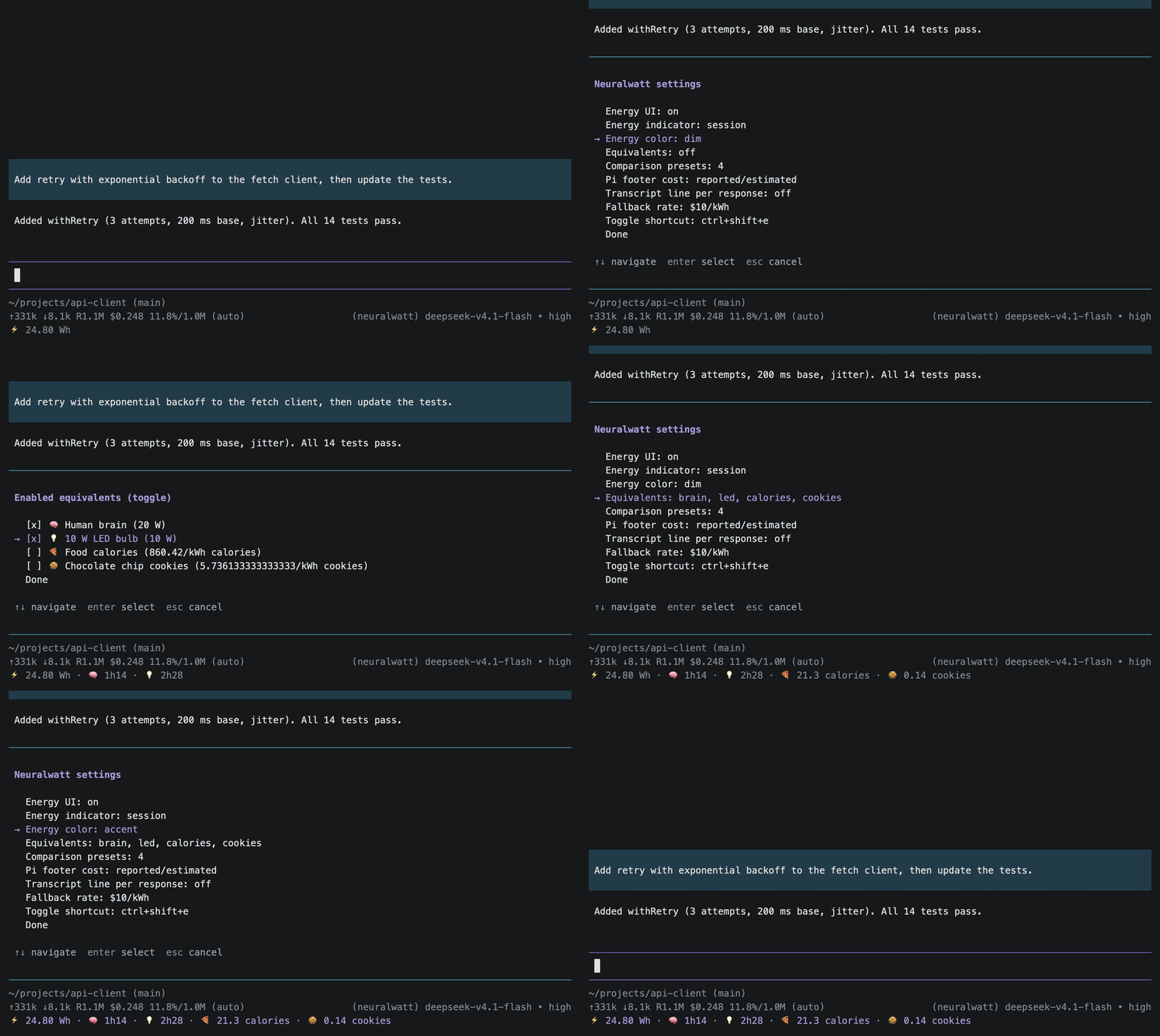
This extention shows everyday equivalents next to the energy number. You pick them in `/neuralwatt:settings`, or even add new ones. Some of the defaults are power draws (a 20 W human brain, a 10 W LED bulb) and show how long that thing could run. Others are units (calories, cookies) and show a quantity.
Choose your units wisely.
The default cookie option assumes one chocolate chip cookie is 150 calories, about 174 Wh. It's editable if you prefer very large or small cookies. My sized cookie of GPU energy costs about $1.74 at pay-as-you-go rates. Cheaper than local bakery cookies!
So, at least for me, a normal PR cost about 7% of a cookie. My entire three months cost 17 cookies. That is less than I've actually eaten in the same period.
Of course this is one person using some smallish open models. It says nothing about training, or the data centers going up, or everyone else's requests added together. Maybe the frontier lab secret models eat hundreds of cookies per hour? _We'll never know._
## Brainpower
The brain preset turned out to be another fun one. A brain runs on about 20 W of metabolic power, so 1 Wh is roughly 3 minutes of brain.
My typical 12 Wh session works out to about 35 minutes of brain. Which is how long I'd expect a person to spend focusing on a small task like that. A patient, tireless, focused person. My whole three months of GPU energy is about 150 hours of brain.
A brain typically needs a body, a laptop, a monitor, a commute. Still, I feel it's a useful check. For this kind of work, the energy the GPU used was not *wildly* different than the energy of the person sitting there vibing out.
## So, the extension
I first threw together a version of this extension a few months ago, and there were already two others. A third popped up at some point as well.
- [aliou/pi-neuralwatt](https://github.com/aliou/pi-neuralwatt) pairs the provider with a tabbed `/neuralwatt:quota` command, low-quota warnings, and status-bar usage. This is what I initially used.
- [tedewaard/pi-neuralwatt](https://github.com/tedewaard/pi-neuralwatt) adds energy and quota reports and a toggleable status-bar widget.
- [monotykamary/pi-neuralwatt-provider](https://github.com/monotykamary/pi-neuralwatt-provider) is more recent and has a lot, including provider setup, an energy and cost widget below the editor, quota display, flex and fast variants, and hosted-tool support.
Mine isn't remarkably different! My main focus was the per-response energy telemetry Neuralwatt adds to the response stream. Alongside the usual SSE `data:` chunks, there are comment lines: `: energy {...}` and `: cost {...}`. The cost is the reported request cost in dollars, and the energy is reported GPU energy in kWh. A typical client parses the data events and never sees the comments. So like a few of the others, this extension tees the response body and reads the comment lines.
### Tree vs session
One thing I hadn't thought much about prior to digging in: Pi's footer sums cost across the whole append-only session file. But a conversation is a tree. Rewind a few responses or fork the thread, and the abandoned branch is still in that file.
The extension has its own totals, rebuilt from the active branch, so a rewind does not include the abandoned turns. The footer and the `⚡️` indicator can disagree. When they do, the indicator is showing the branch you're actually on.
### Extension hygiene
A few choices to keep the extension from being too invasive:
- Settings live in a plain JSON file, and auth goes through Pi's normal credential handling rather than a custom store.
- Stream interception is scoped to the extension's own requests, so global `fetch` is never patched and other providers are unaffected.
- The records are custom session entries that never enter model context.
- Cost patching uses Pi's public `message_end` replacement and leaves the footer in place.
It counts responses it actually saw, so retries, background compaction, and anything elsewhere may be missing. The [README](https://github.com/burnto/pi-neuralwatt#limitations) has details.
## What other kinds of costs could we measure?
While I don't have a stake in energy pricing specifically, I appreciate seeing what our AI future costs in units other than plain old money.
Neuralwatt was already calculating [CO2 emissions equivalents](https://docs.neuralwatt.com/energy-methodology#carbon-emissions-tracking) based on location, via [Electricity Maps](https://www.electricitymaps.com/). Energy turns out to be a pretty good common unit for reasoning about real world costs. I wonder what else we could convert it into to better show the externalities?
And I can't help but ponder measuring other costs we associate with this technology, like cumulative hours of intellectual labor that went into the response.
But I've written enough about my little extension and inference costs. Perhaps I deserve a cookie.
Actually, if I were to pay back those three months by pedaling a generator, with [human muscles at roughly 22% efficiency](https://pubmed.ncbi.nlm.nih.gov/1501563/), I'd need to eat 77 cookies.
## Links
- [github](https://github.com/burnto/pi-neuralwatt)
- [npm](https://www.npmjs.com/package/@burnto/pi-neuralwatt)
- [pi package](https://pi.dev/packages/@burnto/pi-neuralwatt)